Check the site works correctly (part 1)
Learn how to add assertions and avoid all these "waitFor"s.
Due to auto-waiting mechanisms, a recorded test case tests many web functionality and critical user flows already. To nail down implementation details and test for data correctness, you need to add assertions.
Generic vs async assertions (web-first assertions)
Playwright Test provides an assertion library out of the box.
import { test, expect } from "@playwright/test";
expect provides generic and (!) async assertions.
Generic matchers are synchronous and are valuable for simple comparisons such as comparing two numbers.
// a synchronous generic assertion
expect(number).toBe(2);
To test web functionality, though, async assertions come as a handy alternative.
Playwright's asynchronous web-first assertions are tailored to the web. They're based on the same auto-waiting principles you already know about and wait / retry until a condition is met or the time out is reached.
// an asynchronous web-first assertion
// this assertion waits / retries until the located element becomes visible
await expect(page.getByText("welcome")).toBeVisible();
If you're testing websites, web-first assertions are more convenient to write and leverage PWT's core functionality.
import { test, expect } from "@playwright/test";

test("has title", async ({ page }) => {
  await page.goto("https://playwright.dev/");

  // 👎
  // test a condition at a single moment in time
  expect(await page.getByText("welcome").isVisible()).toBe(true);

  // 👍
  // wait for a condition to become truthy over time
  await expect(page.getByText("welcome")).toBeVisible();
});
Web-first assertions are async — you must await them. A missing await
doesn't fail loudly: it returns a Promise (which is truthy), the assertion
never actually runs, and the test passes silently.
Common web-first matchers
expect ships with a long list of matchers. The most common ones group into three buckets.
toBeVisibletoBeHiddentoBeAttachedin the DOM, even if not visibletoBeEnabledtoBeDisabledtoBeCheckedtoBeFocusedtoBeEmptytoBeInViewporttoHaveTextexact matchtoContainTextsubstring matchtoHaveValueform fieldstoHaveAttribute(name, value)toHaveClasstoHaveCountnumber of matched elementstoHaveURLtoHaveTitletoHaveScreenshotvisual regression — covered laterA handful of these matchers — toHaveText, toContainText, toHaveCount — work against locators that match multiple elements, no .first() / .nth() / .last() loop required.
Assert on the whole product grid at once
The stage below renders three product cards. Instead of writing one assertion per card, confirm two things in a single line each:
- The grid renders exactly three products.
- The product names appear in this order:
Product 1,Product 2,Product 3.
Product 1
Product 2
Product 3
▸ Show the assertions
toHaveCount checks how many elements a locator resolved to. toHaveText
accepts an array and compares it element-by-element against the matched
set — content and order.
const cards = page.getByRole("listitem");
await expect(cards).toHaveCount(3);

const names = page.getByRole("heading", { level: 3 });
await expect(names).toHaveText(["Product 1", "Product 2", "Product 3"]);
Re-shuffle the cards and the array assertion fails with a clear diff against the expected order.
There are some core things to know about assertions.
Configurable timeouts
Web-first assertions have a timeout config option if things take longer.
await expect(page.getByText("welcome")).toBeVisible({ timeout: 10_000 });
The default timeout is 5s and can be changed on a project basis in your
Playwright config under expect.timeout.
Soft assertions
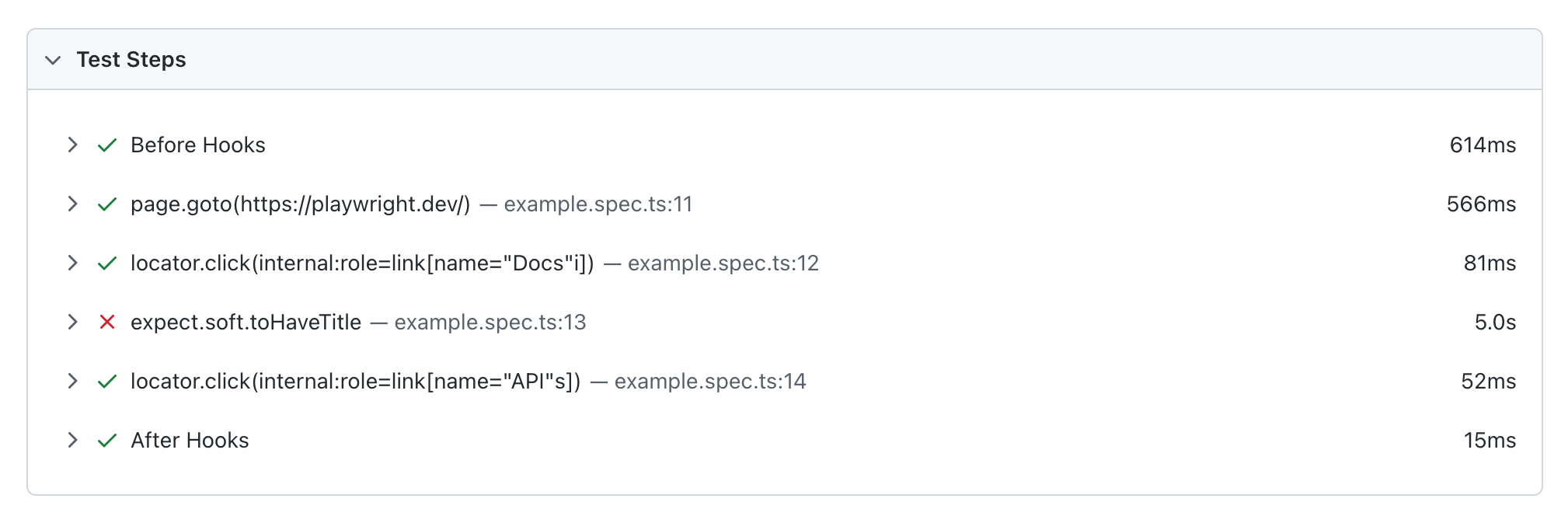
Soft assertions (expect.soft) are a handy way to fail your test case but still try to run the following actions.
test("has title", async ({ page }) => {
  await page.goto("https://playwright.dev/");

  // If this assertion fails the test case will be marked as failed
  await expect.soft(page.getByTestId("status")).toHaveText("Success");

  // But all the following actions will still be executed and tested
  // ...
});
Soft assertion are particularly helpful when running longer tests. A soft assertion will lead to test failure but the test still continues running.
Assertions can be negated
Assertions also provide a quick way to flip around their meaning.
await expect(locator).toBeVisible();
await expect(locator).not.toBeVisible();
Custom assertion messages
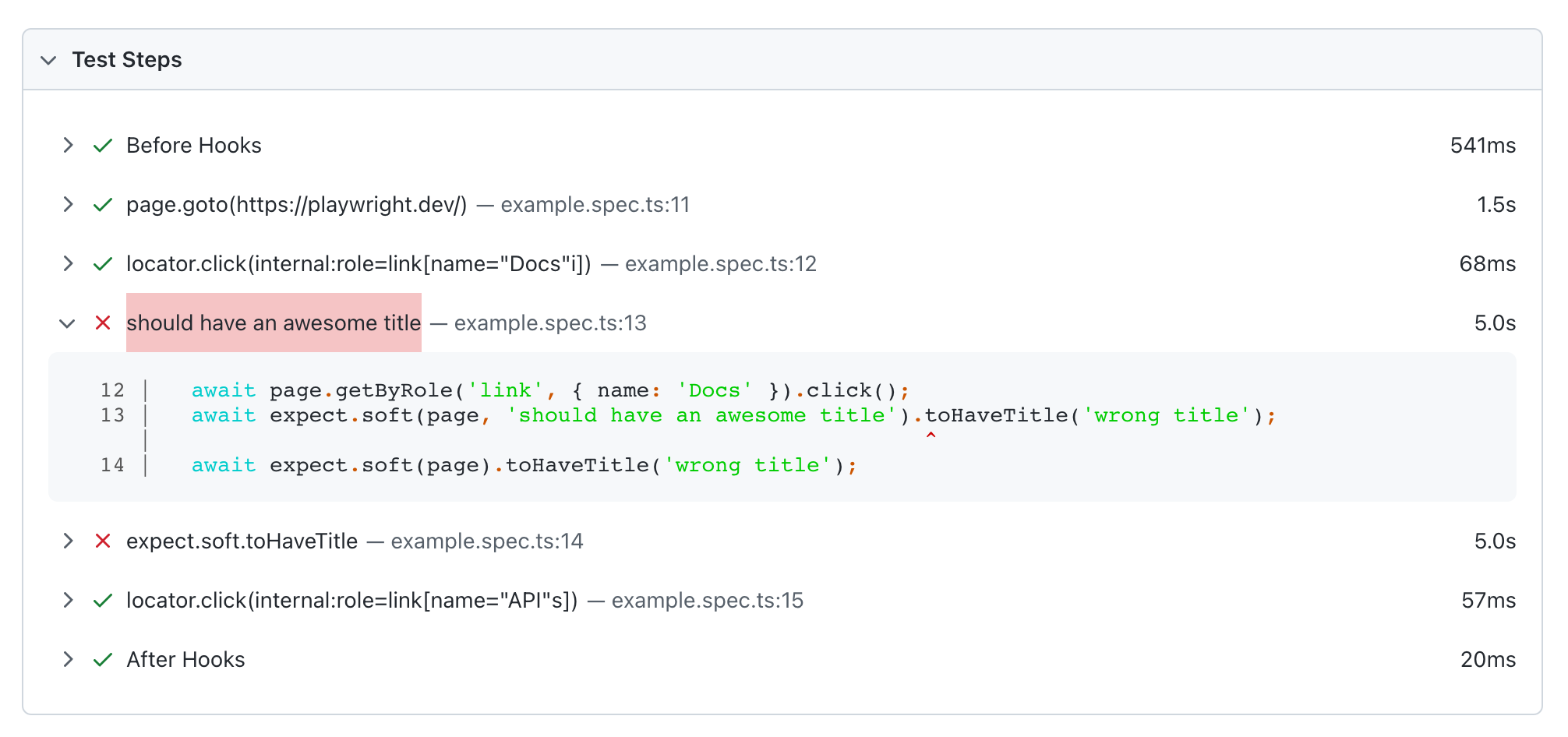
To make your assertions more readable in your test reports. You can also define a custom message.
await expect
  .soft(page, "should have an awesome title")
  .toHaveTitle("wrong title");
❗ Auto-waiting is the most important core principle in Playwright Test
With the built-in auto-waiting mechanisms you rarely have to implement manual waitFor statements.
// click() waits for the element to be actionable
// click() waits for a triggered navigation to complete
await locator.click();

// wait for the assertion to become truthy or time out
await expect(anotherLocator).toBeVisible();
Unless you want to explicitely wait for a particular URL there's little
benefit in calling page.waitForUrl or similar methods.
Depending on the site you want to test, you might want to tweak the timeout configuration. These are Playwright's default timeouts for the mentioned auto-waiting concepts.
Test Timeout: 30000ms
👉 config.timeout or `test.setTimeout(120_000)`

`expect` Timeout: 5000ms
👉 config.expect.timeout or `expect(locator).toBeVisible({ timeout: 10000 })`

Action Timeout: no timeout
👉 config.use.actionTimeout or `locator.click({ timeout: 10000 })`

Navigation timeout: no timeout
👉 config.use.navigationTimeout or `page.goto('/', { timeout: 30000 })`)
Tweak and adjust them as you need.